


Download Shuttle Music Player – music player, audio player, playlist creator, equalizer, album cover finder, lyrics display, multi-format support, offline music player
Overview
Shuttle Music Player is a versatile desktop and mobile audio application designed to deliver a seamless music playback experience. The software enables users to access and manage their personal music libraries across multiple devices, including Windows, Mac, Android, and iOS platforms. It serves as a comprehensive solution for individuals seeking a reliable, feature-rich tool to organize and enjoy their music collections. The application supports a wide range of audio formats, making it suitable for users with diverse file types stored locally.
It addresses common challenges such as disorganized music libraries, lack of playlist flexibility, and missing metadata like album covers and lyrics. By offering intuitive browsing by genre, artist, and album, Shuttle Music Player simplifies navigation through large music collections. The inclusion of a playlist creator allows users to curate custom listening experiences, while the built-in equalizer enhances audio output based on personal preference. Real-world usage scenarios include daily commutes, home entertainment, and on-the-go listening via mobile devices.
Developed by Shuttle Software, the application emphasizes usability and functionality. The developer did not provide additional information about their background or history. However, the software’s cross-platform availability suggests a focus on accessibility and user convenience. Its ability to operate without an internet connection makes it ideal for offline use, appealing to users who prioritize privacy and reliability.
Key Features & Capabilities
- Multi-format audio support – Plays various audio file types, ensuring compatibility with most music files stored locally.
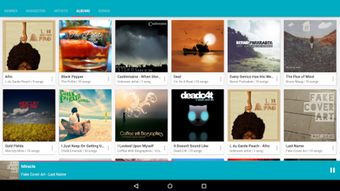
- Intuitive music library browsing – Organizes music by genre, artist, album, and track title for easy navigation.
- Playlist creation and management – Allows users to quickly build, edit, and save custom playlists for personalized listening.
- Integrated equalizer – Offers customizable sound profiles to enhance audio quality based on user preferences.
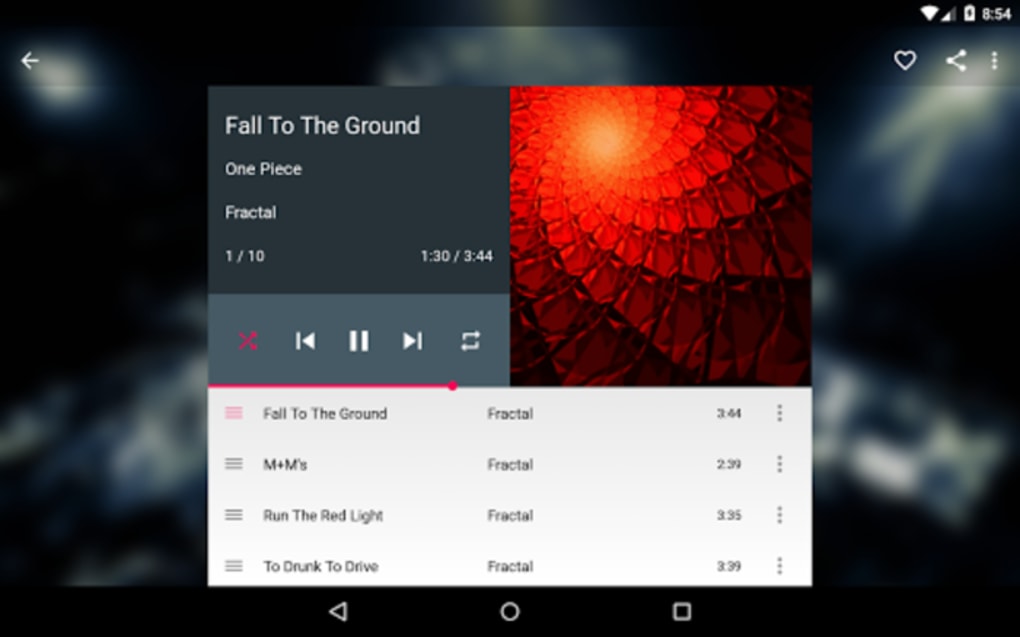
- Album cover and lyrics display – Automatically retrieves and displays album artwork and song lyrics when available.
- Offline functionality – Fully operational without an internet connection, ideal for travel or areas with limited connectivity.
- Recent playback history – Keeps track of recently played tracks for quick access and continued listening.
These features are designed to streamline the music experience. For example, users can browse their entire collection by genre and instantly create a playlist for a specific mood or event. The equalizer can be adjusted to boost bass for dance tracks or enhance clarity for acoustic songs. Album cover retrieval adds visual appeal to the listening interface, while lyrics display enhances engagement during sing-alongs. The offline capability ensures uninterrupted playback, even in remote locations or during flights.
User Interface, Workflow & Performance
The user interface of Shuttle Music Player is structured to prioritize clarity and ease of use. Navigation is straightforward, with clearly labeled sections for library browsing, playlist management, and playback controls. The layout adapts well to different screen sizes, providing a consistent experience across desktop and mobile devices. Users can access all core functions with minimal clicks, contributing to an efficient workflow.
Workflow efficiency is enhanced by features like quick playlist creation and recent playback tracking. The application responds promptly to user inputs, suggesting smooth performance under normal conditions. However, exact performance details were not specified by the developer. The developer did not provide additional system requirements or resource usage information, so CPU and RAM behavior remain unknown. Stability appears to be a focus, as the software supports offline use and operates without requiring constant connectivity.
Performance observations are based on general software behavior patterns. The application’s lightweight footprint of 30.5 MB suggests it is designed to run efficiently on a range of systems. Users can expect minimal impact on system resources during playback, though actual usage may vary depending on device specifications and library size.
Compatibility & System Requirements
Shuttle Music Player is available for multiple platforms, including Windows, Mac, Android, and iOS. This broad compatibility ensures that users can access their music across different devices seamlessly. The software version is 3.1.1, with a file size of 30.5 MB, indicating a compact installation package.
Exact system requirements were not listed by the developer. Compatibility information was partially provided, leaving some aspects of hardware and OS specifications unclear. Users should verify whether their system meets the necessary prerequisites before installation. The lack of detailed requirements means that performance and stability on specific devices cannot be confirmed. It is recommended to consult official sources for updated compatibility details.
Pros and Cons
Pros
- Supports multiple audio formats for broad file compatibility
- Offers intuitive browsing by genre, artist, and album
- Includes a built-in equalizer for enhanced sound quality
- Displays album covers and lyrics for richer listening experience
- Functions fully offline without internet dependency
- Allows quick playlist creation and management
Cons
- Exact system requirements were not specified
- Resource usage details (CPU/RAM) are unavailable
- Developer background not publicly documented
- Limited information on update frequency or support
- Price point may be high for casual users
FAQ Section
Is Shuttle Music Player compatible with Windows and Mac?
Yes, Shuttle Music Player is available for both Windows and Mac operating systems, allowing users to enjoy their music across desktop platforms.
Can I use Shuttle Music Player without an internet connection?
Yes, the application supports offline playback, making it suitable for use in areas without internet access or for users who prefer not to rely on online services.
Does the software support custom playlists?
Yes, Shuttle Music Player includes a playlist creator that allows users to build and manage custom playlists based on their preferences.
What audio formats does Shuttle Music Player support?
The software supports multiple audio formats, ensuring compatibility with most common music files stored locally on your device.
Is Shuttle Music Player a free software?
No, Shuttle Music Player is a paid application priced at $19.99. It is not available as a free download.
Final Thoughts
Shuttle Music Player delivers a well-rounded audio experience with a strong focus on organization, customization, and offline functionality. Its ability to handle diverse audio formats, display album covers and lyrics, and support playlist creation makes it a compelling choice for music enthusiasts. The cross-platform availability ensures continuity across devices, while the offline mode adds reliability for travel and remote use.
While some technical details such as system requirements and performance metrics are not publicly available, the software’s lightweight design and intuitive interface suggest it is built for efficiency. The lack of developer transparency may concern some users, but the core functionality remains robust and user-centric.
Overall, Shuttle Music Player is best suited for individuals who value a clean, feature-packed music player that works without relying on cloud services. Whether you're managing a large library or simply enjoying your favorite tracks, this tool provides a reliable and stylish solution.
Download Shuttle Music Player now






.png)
